use platform APIs to access deeper data & automate insights
Modern marketing isn’t about monitoring dashboards it’s about building systems that connect data, automation, and decision-making.
Google Ads and Meta Ads make campaign management look simple. Adjust budgets, swap creatives, check performance easy.
But behind that simplicity lies a massive amount of untapped data and automation potential. Most advertisers never touch it.
That’s where APIs change the game. Just as BigQuery transformed data analysis, APIs open up what can be measured, automated, and optimized inside ad platforms.
They connect systems, surface insights dashboards can’t show, and enable automation that directly improves PPC performance and creative strategy.
And thanks to AI lowering the technical barrier, APIs are no longer tools reserved for developers — they’re competitive advantages for marketers who know how to use them.
APIs unlock what interfaces can’t
Ad platform interfaces are designed for accessibility, not depth. They simplify workflows, but that convenience hides data that can uncover real business impact.
APIs let you go deeper linking data across sources, uncovering hidden patterns, and creating custom reports impossible to generate in the standard UI.
example:
The Search Console API can connect SEO data with SERP-level results through the SERP API, revealing shifts in keyword intent you’d never see in Search Console itself.
Meta offers the same kind of access. Its APIs provide far more granular data for reporting and optimization than what’s available in Meta Ads Manager.
Among them, the Meta Marketing API is particularly powerful.
finding hidden product Insights with the meta marketing API
For eCommerce brands, the standard Meta Ads interface groups all product data impressions, clicks, and revenue into broad summaries.
That makes SKU-level insights invisible.
The Meta Marketing API exposes that missing layer. You can analyze performance at the SKU level, by brand or category, and identify new opportunities or underperforming products.
Here’s what a typical SKU-level dataset from the API looks like:
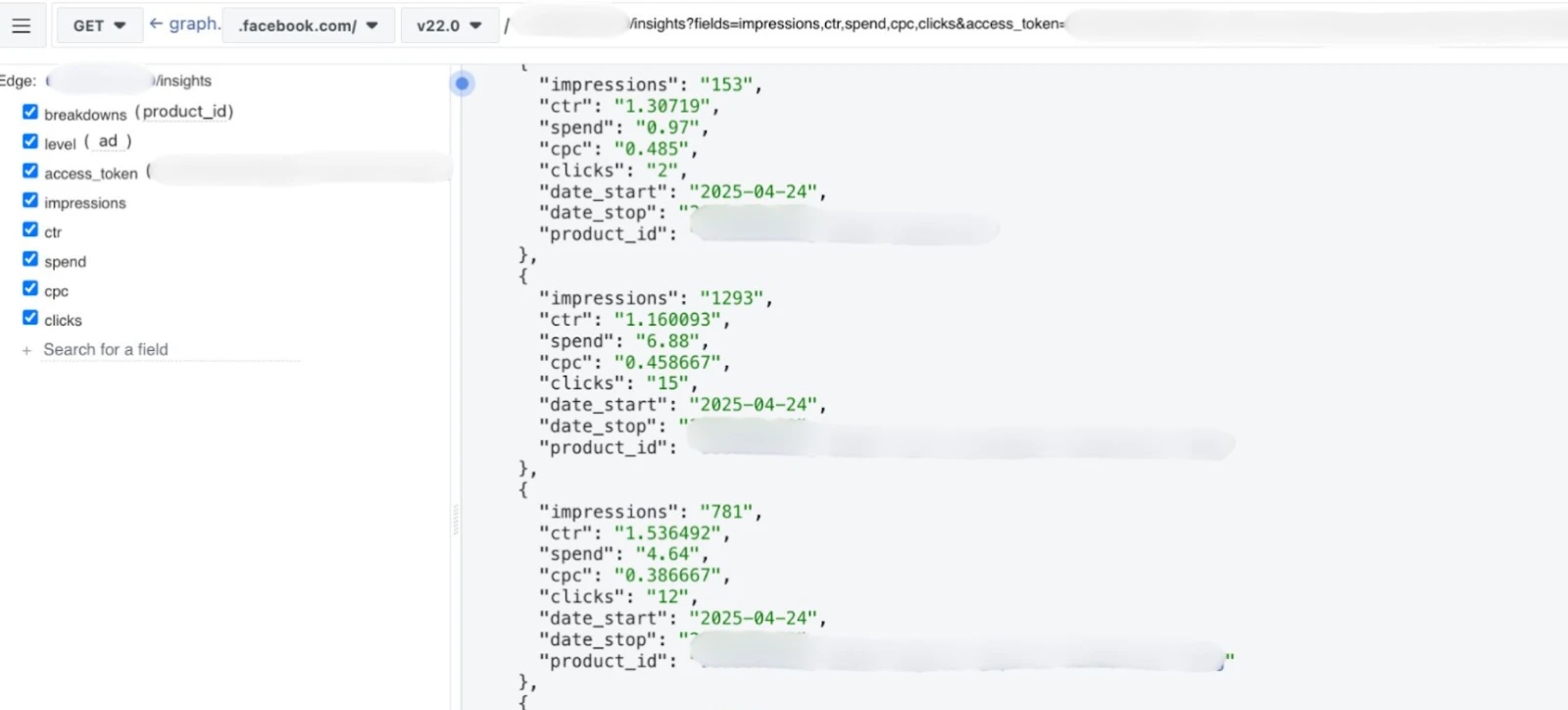
You can automatically export this data to a spreadsheet or sync it using Google Apps Script building a live feedback loop between product performance and ad optimization.
turning data into dynamic product sets
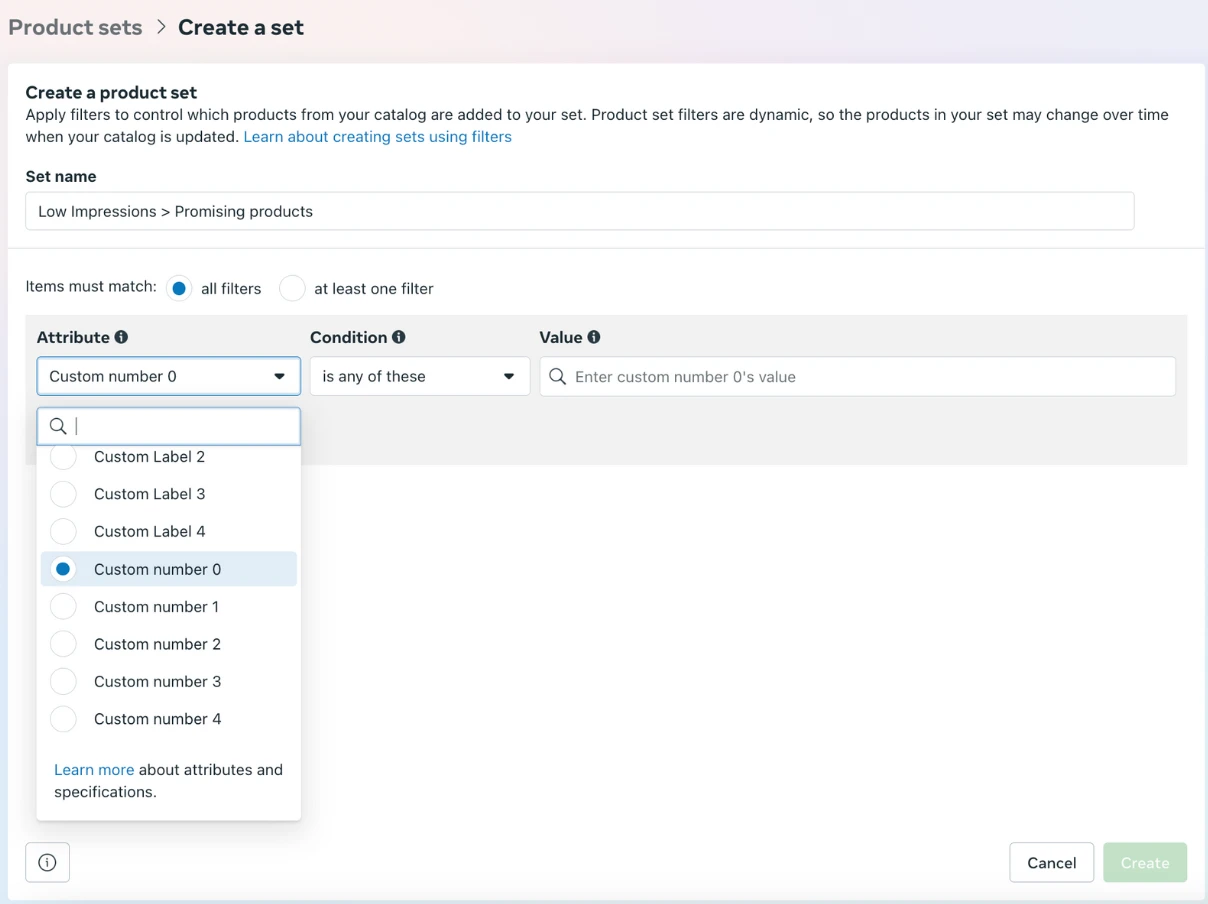
Once you’ve mapped SKU data into your product feed as custom labels or numbers, you can use it to create dynamic product sets in Meta.
That enables new automation strategies, such as:
Top-performing products
Newly launched products
Low-performing or “sleeping” products
Items with high add-to-cart activity but low sales
While Meta has supported custom labels for years, the real innovation comes from automatically updating those labels in real time - driven by live Product Ads data through the API.
That’s the kind of precision you can’t achieve through the interface alone.
getting started with the meta marketing API
Before diving in, it’s important to understand the difference between Meta’s two key APIs:
Insights API retrieves data for reporting and analysis.
Marketing API goes further, allowing you to manage campaigns, pull product-level data, and even run A/B tests.
To use it, you’ll need:
A Business Manager with ad account access and a product catalog.
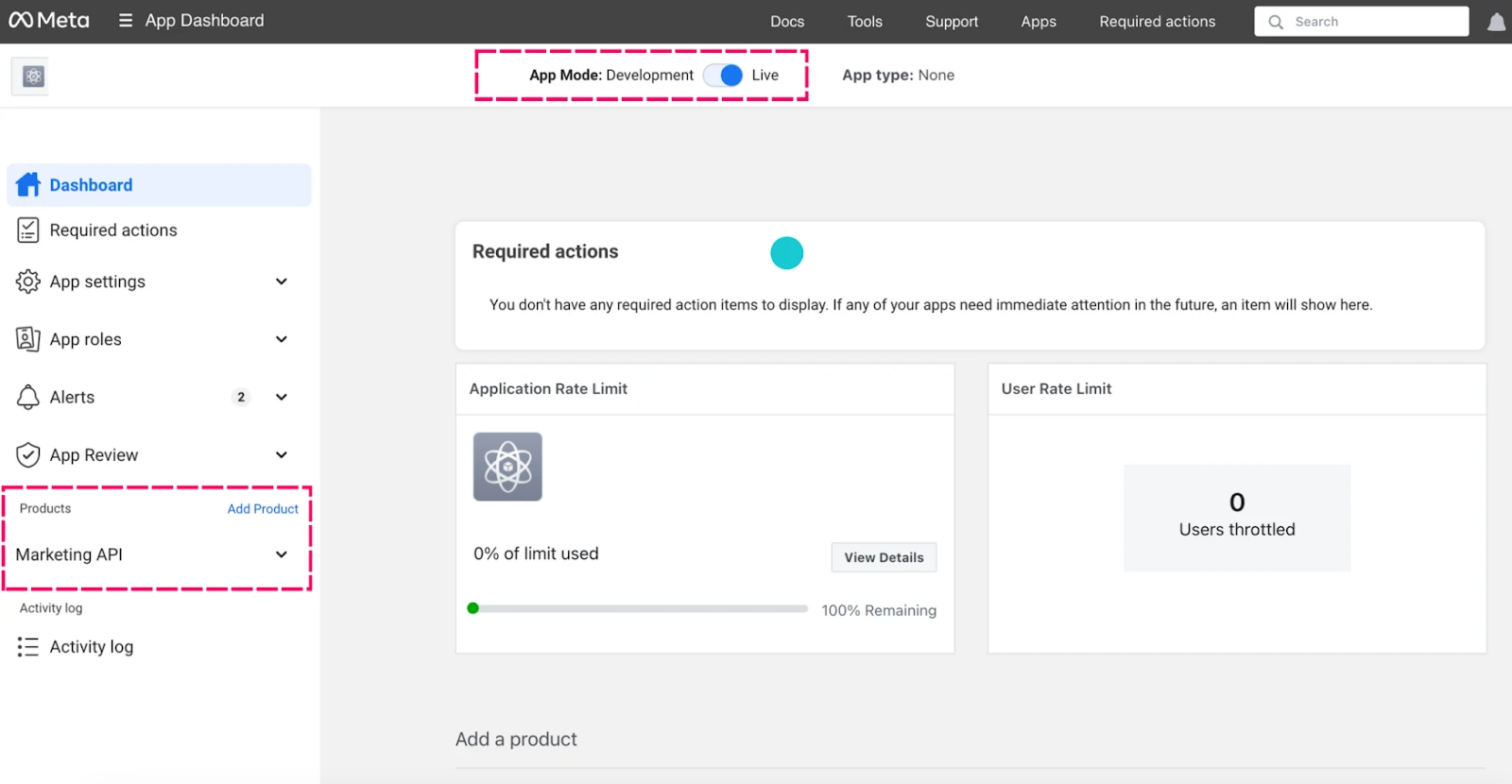
A developer app created in Meta’s Developer Portal
with permissions for ads_read, ads_management,
and catalog_management.
Once set up, use the Graph API Explorer to generate your access token.
You can then connect that data to Google Sheets, BigQuery, or any other data visualization or automation tool.
No coding background required AI tools can assist with script generation or handle calls directly.
expanding automation and insights with the google ads API
The Google Ads API has evolved dramatically. What once required developer tokens and command-line expertise is now accessible to marketers through tools like Cursor, AI copilots, and automation frameworks.
You can use it to:
Automate bid and budget adjustments
Update ad copy or creatives
Add or manage negatives dynamically
Build custom performance dashboards
The API powers much of today’s advanced PPC automation from scripts by experts like Mike Rhodes and Frederick Vallaeys to in-house systems built by performance-driven teams.
To get started:
Set up an MCC (manager) account and request a developer token.
Create a Google Cloud Project and enable the Google Ads API.
Use the credentials in your automation scripts to perform API calls.
With AI, creating these workflows is faster than ever. You can automate nearly any routine process in your ad account without writing complex code.
For deeper integration, Google’s new MCP Server provides even more flexibility for large-scale automation.
seeing marketing as a system, not a dashboard
Modern marketing isn’t about monitoring dashboards it’s about building systems that connect data, automation, and decision-making.
APIs make that possible. They’re no longer hidden developer tools but accessible levers for marketers who want to scale smarter.
To start:
Define what problem you want to solve or what process you want to automate.
Experiment with LLMs or no-code tools to prototype simple scripts.
Begin small test, refine, and expand.
You don’t need to be technical to think systematically. Curiosity, logic, and experimentation matter more than code.
Every improvement from automated labels to budget reallocation compounds. Over time, your API-driven system becomes the backbone of smarter, faster, data-led marketing.
Whether it’s custom reporting through Meta and Google Ads APIs or full-funnel performance automation, we handle the research, setup, and optimization so you can focus on growth.

Code is just a tool. Тhe goal is growth.
Google Ads and Meta Ads make campaign management look simple. Adjust budgets, swap creatives, check performance easy.
But behind that simplicity lies a massive amount of untapped data and automation potential. Most advertisers never touch it.
That’s where APIs change the game. Just as BigQuery transformed data analysis, APIs open up what can be measured, automated, and optimized inside ad platforms.
They connect systems, surface insights dashboards can’t show, and enable automation that directly improves PPC performance and creative strategy.
And thanks to AI lowering the technical barrier, APIs are no longer tools reserved for developers — they’re competitive advantages for marketers who know how to use them.
APIs unlock what interfaces can’t
Ad platform interfaces are designed for accessibility, not depth. They simplify workflows, but that convenience hides data that can uncover real business impact.
APIs let you go deeper linking data across sources, uncovering hidden patterns, and creating custom reports impossible to generate in the standard UI.
example:
The Search Console API can connect SEO data with SERP-level results through the SERP API, revealing shifts in keyword intent you’d never see in Search Console itself.
Meta offers the same kind of access. Its APIs provide far more granular data for reporting and optimization than what’s available in Meta Ads Manager.
Among them, the Meta Marketing API is particularly powerful.
finding hidden product Insights with the meta marketing API
For eCommerce brands, the standard Meta Ads interface groups all product data impressions, clicks, and revenue into broad summaries.
That makes SKU-level insights invisible.
The Meta Marketing API exposes that missing layer. You can analyze performance at the SKU level, by brand or category, and identify new opportunities or underperforming products.
Here’s what a typical SKU-level dataset from the API looks like:
You can automatically export this data to a spreadsheet or sync it using Google Apps Script building a live feedback loop between product performance and ad optimization.
turning data into dynamic product sets
Once you’ve mapped SKU data into your product feed as custom labels or numbers, you can use it to create dynamic product sets in Meta.
That enables new automation strategies, such as:
Top-performing products
Newly launched products
Low-performing or “sleeping” products
Items with high add-to-cart activity but low sales
While Meta has supported custom labels for years, the real innovation comes from automatically updating those labels in real time - driven by live Product Ads data through the API.
That’s the kind of precision you can’t achieve through the interface alone.
getting started with the meta marketing API
Before diving in, it’s important to understand the difference between Meta’s two key APIs:
Insights API retrieves data for reporting and analysis.
Marketing API goes further, allowing you to manage campaigns, pull product-level data, and even run A/B tests.
To use it, you’ll need:
A Business Manager with ad account access and a product catalog.
A developer app created in Meta’s Developer Portal
with permissions for ads_read, ads_management,
and catalog_management.
Once set up, use the Graph API Explorer to generate your access token.
You can then connect that data to Google Sheets, BigQuery, or any other data visualization or automation tool.
No coding background required AI tools can assist with script generation or handle calls directly.
expanding automation and insights with the google ads API
The Google Ads API has evolved dramatically. What once required developer tokens and command-line expertise is now accessible to marketers through tools like Cursor, AI copilots, and automation frameworks.
You can use it to:
Automate bid and budget adjustments
Update ad copy or creatives
Add or manage negatives dynamically
Build custom performance dashboards
The API powers much of today’s advanced PPC automation from scripts by experts like Mike Rhodes and Frederick Vallaeys to in-house systems built by performance-driven teams.
To get started:
Set up an MCC (manager) account and request a developer token.
Create a Google Cloud Project and enable the Google Ads API.
Use the credentials in your automation scripts to perform API calls.
With AI, creating these workflows is faster than ever. You can automate nearly any routine process in your ad account without writing complex code.
For deeper integration, Google’s new MCP Server provides even more flexibility for large-scale automation.
seeing marketing as a system, not a dashboard
Modern marketing isn’t about monitoring dashboards it’s about building systems that connect data, automation, and decision-making.
APIs make that possible. They’re no longer hidden developer tools but accessible levers for marketers who want to scale smarter.
To start:
Define what problem you want to solve or what process you want to automate.
Experiment with LLMs or no-code tools to prototype simple scripts.
Begin small test, refine, and expand.
You don’t need to be technical to think systematically. Curiosity, logic, and experimentation matter more than code.
Every improvement from automated labels to budget reallocation compounds. Over time, your API-driven system becomes the backbone of smarter, faster, data-led marketing.
Whether it’s custom reporting through Meta and Google Ads APIs or full-funnel performance automation, we handle the research, setup, and optimization so you can focus on growth.
Code is just a tool. Тhe goal is growth.
Google Ads and Meta Ads make campaign management look simple. Adjust budgets, swap creatives, check performance easy.
But behind that simplicity lies a massive amount of untapped data and automation potential. Most advertisers never touch it.
That’s where APIs change the game. Just as BigQuery transformed data analysis, APIs open up what can be measured, automated, and optimized inside ad platforms.
They connect systems, surface insights dashboards can’t show, and enable automation that directly improves PPC performance and creative strategy.
And thanks to AI lowering the technical barrier, APIs are no longer tools reserved for developers — they’re competitive advantages for marketers who know how to use them.
APIs unlock what interfaces can’t
Ad platform interfaces are designed for accessibility, not depth. They simplify workflows, but that convenience hides data that can uncover real business impact.
APIs let you go deeper linking data across sources, uncovering hidden patterns, and creating custom reports impossible to generate in the standard UI.
example:
The Search Console API can connect SEO data with SERP-level results through the SERP API, revealing shifts in keyword intent you’d never see in Search Console itself.
Meta offers the same kind of access. Its APIs provide far more granular data for reporting and optimization than what’s available in Meta Ads Manager.
Among them, the Meta Marketing API is particularly powerful.
finding hidden product Insights with the meta marketing API
For eCommerce brands, the standard Meta Ads interface groups all product data impressions, clicks, and revenue into broad summaries.
That makes SKU-level insights invisible.
The Meta Marketing API exposes that missing layer. You can analyze performance at the SKU level, by brand or category, and identify new opportunities or underperforming products.
Here’s what a typical SKU-level dataset from the API looks like:
You can automatically export this data to a spreadsheet or sync it using Google Apps Script building a live feedback loop between product performance and ad optimization.
turning data into dynamic product sets
Once you’ve mapped SKU data into your product feed as custom labels or numbers, you can use it to create dynamic product sets in Meta.
That enables new automation strategies, such as:
Top-performing products
Newly launched products
Low-performing or “sleeping” products
Items with high add-to-cart activity but low sales
While Meta has supported custom labels for years, the real innovation comes from automatically updating those labels in real time - driven by live Product Ads data through the API.
That’s the kind of precision you can’t achieve through the interface alone.
getting started with the meta marketing API
Before diving in, it’s important to understand the difference between Meta’s two key APIs:
Insights API retrieves data for reporting and analysis.
Marketing API goes further, allowing you to manage campaigns, pull product-level data, and even run A/B tests.
To use it, you’ll need:
A Business Manager with ad account access and a product catalog.
A developer app created in Meta’s Developer Portal
with permissions for ads_read, ads_management,
and catalog_management.
Once set up, use the Graph API Explorer to generate your access token.
You can then connect that data to Google Sheets, BigQuery, or any other data visualization or automation tool.
No coding background required AI tools can assist with script generation or handle calls directly.
expanding automation and insights with the google ads API
The Google Ads API has evolved dramatically. What once required developer tokens and command-line expertise is now accessible to marketers through tools like Cursor, AI copilots, and automation frameworks.
You can use it to:
Automate bid and budget adjustments
Update ad copy or creatives
Add or manage negatives dynamically
Build custom performance dashboards
The API powers much of today’s advanced PPC automation from scripts by experts like Mike Rhodes and Frederick Vallaeys to in-house systems built by performance-driven teams.
To get started:
Set up an MCC (manager) account and request a developer token.
Create a Google Cloud Project and enable the Google Ads API.
Use the credentials in your automation scripts to perform API calls.
With AI, creating these workflows is faster than ever. You can automate nearly any routine process in your ad account without writing complex code.
For deeper integration, Google’s new MCP Server provides even more flexibility for large-scale automation.
seeing marketing as a system, not a dashboard
Modern marketing isn’t about monitoring dashboards it’s about building systems that connect data, automation, and decision-making.
APIs make that possible. They’re no longer hidden developer tools but accessible levers for marketers who want to scale smarter.
To start:
Define what problem you want to solve or what process you want to automate.
Experiment with LLMs or no-code tools to prototype simple scripts.
Begin small test, refine, and expand.
You don’t need to be technical to think systematically. Curiosity, logic, and experimentation matter more than code.
Every improvement from automated labels to budget reallocation compounds. Over time, your API-driven system becomes the backbone of smarter, faster, data-led marketing.
Whether it’s custom reporting through Meta and Google Ads APIs or full-funnel performance automation, we handle the research, setup, and optimization so you can focus on growth.
Code is just a tool. Тhe goal is growth.
subscribe to our
weekly
newsletter
Get curated marketing insights, expert tips, and the latest agency news delivered straight to your inbox every week. Stay ahead with us.

subscribe to our
weekly
newsletter
Get curated marketing insights, expert tips, and the latest agency news delivered straight to your inbox every week. Stay ahead with us.
subscribe to our
weekly
newsletter
Get curated marketing insights, expert tips, and the latest agency news delivered straight to your inbox every week. Stay ahead with us.