Framer vs WordPress: which one to choose?
Framer or WordPress? Which one to choose in 2026?
Most early-stage startups default to WordPress because it feels “free” and familiar but in the WordPress vs Framer reality of 2026, that choice is usually a mistake.
Unless you are building a massive media publication or a complex directory, WordPress quickly becomes technical debt waiting to happen. For 90% of startups - SaaS, agencies, and service businesses - Framer is the superior choice because it solves the one problem you cannot afford to struggle with: speed.
This guide breaks down exactly why the landscape has shifted, supported by 2026 data on security, total cost of ownership, and real-world performance benchmarks.
overview
Framer is the best choice for startups, SaaS companies, and marketing teams that need to move fast. It eliminates the need for a dedicated developer to manage the marketing site, allowing you to publish changes instantly without worrying about servers or plugins.
WordPress is only recommended if your business model is the content (like a high-volume publisher) or if you require complex database relationships and user login functionality that go beyond a standard marketing brochure.
Recommendation: Use Framer to validate and scale your brand. Use WordPress only if you have a DevOps engineer on payroll.
quick comparison table
Feature | Framer | WordPress |
|---|---|---|
primary goal | visual speed & design | flexibility & ownership |
maintenance | zero (hosted SaaS) | high (updates, plugins, security) |
security risk | near zero (Closed System) | high (13k+ hacks/day globally) |
design freedom | 100% (Canvas-based) | limited by theme/builder |
hosting cost | included ($30-$100/mo) | separate ($10-$500/mo) |
CMS | simple & visual | powerful but Cluttered |
plugins | curated & built-in | massive (60k+ plugins) |
speed to launch | days | weeks/months |
the speed to market reality
In a startup, your website is a marketing asset, not an IT project. The biggest hidden cost of WordPress is the "translation layer" between design and code.
Framer is design-to-live
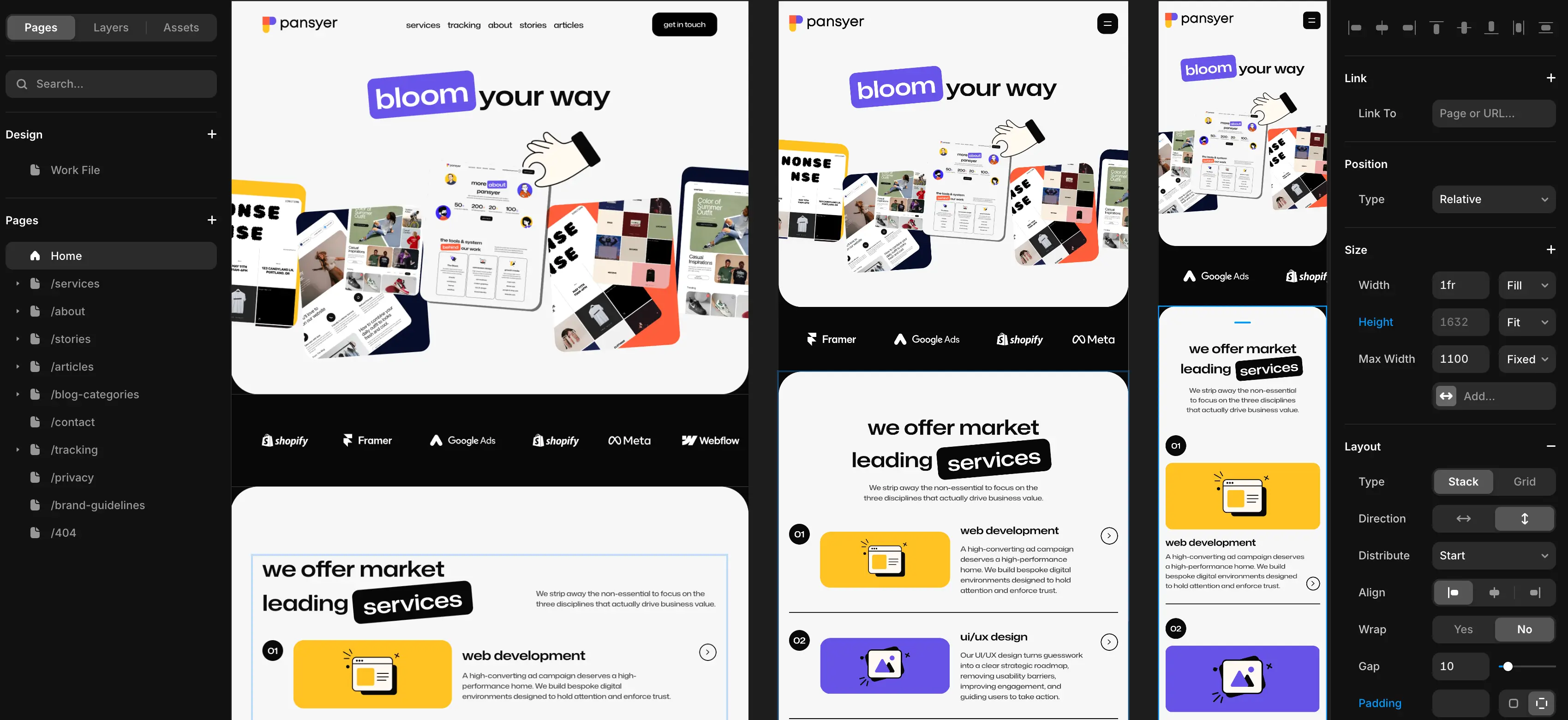
Framer works like Figma. Your designer draws the site, clicks publish, and it is live globally on an enterprise-grade CDN. There is no handoff. There is no developer who needs to take the Figma file and spend two weeks coding it into a custom theme. This creates a feedback loop so fast it feels like cheating. You can test a new pricing page in the morning, see the analytics by noon, and iterate on the copy by lunch.
WordPress requires configuration
WordPress is powerful, but it is slow to set up. You need to buy a domain, set up hosting (like WPEngine or Kinsta), install a theme, configure plugins, and secure the site before you write a single headline. Even with page builders like Elementor, you are fighting against the codebase. Changing a button style globally can break three other pages if you are not careful. This administrative overhead is a distraction from your core product.
the myth of the free CMS
One of the most persistent myths in the startup world is that WordPress is cheaper because it is open source. While the software itself is free, a professional, secure, and fast WordPress site is expensive.
To make WordPress perform like Framer in 2026, you need a stack of paid services:
Managed Hosting: You cannot run a serious startup site on $5 shared hosting. You need managed hosting like WPEngine or Kinsta, which starts at $30–$50/month and scales up quickly as you get traffic.
Premium Plugins: You will likely need paid licenses for forms (Gravity Forms), SEO (RankMath Pro), image optimization (ShortPixel), caching (WP Rocket), and backups. These subscriptions add up to hundreds of dollars a year.
Developer Hours: This is the real cost. Every time a plugin update breaks your header, or a PHP version conflict takes down your checkout, you are paying a developer $100–$150/hour to fix it.
Framer’s all-in-one model
Framer charges a flat monthly fee (usually ~$30/month for the Pro plan). That includes the hosting (AWS), the CDN (Cloudfront), the security, the editor, and the CMS. There are no plugins to buy, no servers to patch, and no surprise invoices. The total cost of ownership over 3 years is often 50% lower than a well-maintained WordPress site.
security: the set and forget advantage
Security is rarely a priority for founders until it becomes a crisis.
WordPress vulnerabilities
WordPress powers over 40% of the web, which makes it the number one target for automated attacks. In 2025, reports showed that approximately 13,000 WordPress sites were hacked every single day. The vast majority of these breaches (over 90%) happened through outdated plugins.
Here is the reality of owning a WordPress site: You must log in every week to update plugins. If you don't, you are vulnerable. If you do, you risk breaking your site because a plugin update might conflict with your theme. It is a constant game of "update roulette."
Framer’s closed ecosystem
Framer is a closed SaaS environment. There is no database for hackers to inject SQL into. There are no plugins to exploit. You do not need a firewall or a security plugin. You can launch your seed-round website, focus on your product for six months, and when you return, the site will be exactly as you left it—secure, fast, and online.
performance and SEO
A common objection to visual builders is that they produce "bloated code" that hurts SEO. In 2026, this is no longer true for Framer.
Core web vitals out of the box
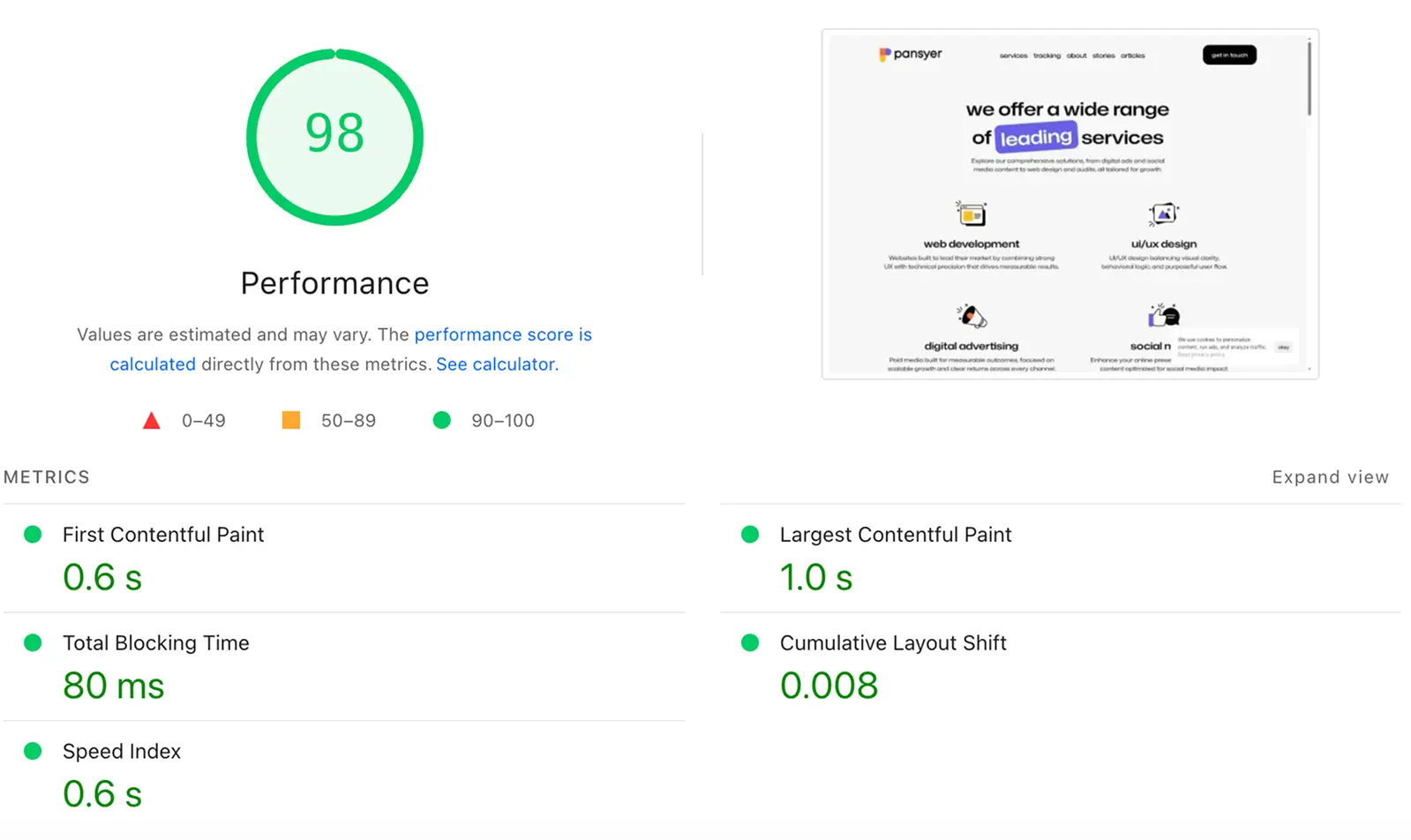
Framer sites are built on React and are server-side rendered (SSR). This means Google sees the full HTML content immediately. Framer automatically optimizes images to WebP, lazy-loads content, and serves everything via a global CDN. Achieving a 95+ score on Google PageSpeed Insights is the default state for a Framer site.
WordPress requires manual tuning
WordPress can be faster than Framer, but only if you are an expert. You need to configure caching layers, minify CSS/JS, optimize database queries, and manage asset delivery. If you just install a heavy theme and ten plugins, your WordPress site will be sluggish and fail Core Web Vitals, hurting your Google rankings.
Technical SEO features
Framer includes automatic sitemaps, semantic HTML tags (H1, H2, etc.), and complete control over meta tags and open graph images. It handles 99% of the technical SEO needs for a marketing site automatically. WordPress offers more granular control (like specific schema markup for recipes or reviews) via plugins, but for a B2B SaaS or agency site, Framer’s native capabilities are more than sufficient.
It is important to be honest about limitations. Framer is not for everything.
The CMS limit
Framer’s CMS is designed for marketing content: blogs, case studies, team members, and job listings. As of 2026, the Pro plan handles up to 10,000 items, and the Scale plan handles significantly more. For 99% of startups, this is plenty. You are unlikely to write 10,000 blog posts in your first five years.
The functional limit
If you are trying to build a site with user logins, paywalls for content, or a complex multi-vendor marketplace, Framer is the wrong tool. It is not a web app builder. Do not try to build "Airbnb" on Framer. Build your marketing pages on Framer, and host your actual app on a subdomain using the appropriate tech stack (React, Vue, Bubble, etc.).
WordPress scaling
WordPress scales indefinitely because it connects to a real SQL database. If you are The Verge and publishing 50 articles a day with 200 different authors and complex permission structures, WordPress is the correct choice.
Framer: speed vs. flexibility
Pros | Cons |
|---|---|
Unmatched Speed: From design file to live website in minutes, not weeks. | Vendor Lock-in: You cannot export the code to host it on your own server. |
Zero Maintenance: No plugins to update, no PHP versions to manage, no security patches. | Basic E-commerce: Not suitable for complex stores with thousands of SKUs (use Shopify). |
Built-in Performance: AWS hosting and Cloudfront CDN are included in the price. | CMS Limits: Struggles with complex filtering logic compared to a true database. |
Bulletproof Security: Closed ecosystem means no SQL injection risks. | No Backend Logic: You cannot build user logins or complex web apps directly in it. |
WordPress: power vs. maintenance
Pros | Cons |
|---|---|
Total Ownership: You own the code, the database, and the data 100%. | High Maintenance: Requires weekly updates for plugins, themes, and server PHP. |
Infinite Scale: Can handle millions of posts and complex author structures. | Security Risks: The #1 target for hackers; requires constant vigilance. |
Deep Functionality: 60,000+ plugins allow you to build almost anything. | Performance Degradation: Gets slower over time as you add more plugins and content. |
Granular SEO: Complete control over every technical aspect of the site structure. | Cost Creep: Hosting, premium plugins, and dev hours add up quickly. |
Framer vs WordPress: which one to choose?
Choose Framer if:
You are a SaaS, service, or app startup needing a stunning brochure site. It is the right choice if you do not have a DevOps person on the team and simply want the website to look professional and load instantly without ever thinking about servers.
Choose WordPress if:
Your business model is the content (like a high-volume affiliate blog or magazine). It is also the better choice if you need deep, custom functionality like a complex booking engine or a multi-vendor marketplace that requires direct database access.
common mistakes & limitations
Startups often make critical errors when selecting a platform.
Using WordPress "Just Because." Many founders choose WordPress by default because it is famous. They end up spending $2,000/year on maintenance for a 5-page site that Framer could host for $300/year with zero maintenance.
Expecting Framer to be an App. Framer is for the marketing site, not your web app. Do not try to build your SaaS product inside Framer. Build the product in React/Vue, and build the landing page in Framer.
Cheap WordPress Hosting. Buying $3/month hosting ensures your site will be slow and insecure. If you choose WordPress, you must budget for managed hosting (like WPEngine) to match Framer's performance.
We specialize in web development, building exclusively on high-speed platforms like Framer so that when we hand over the keys, you’re fully equipped to manage and grow your site yourself. If you’re ready to stop fixing your website and start using it, we’re ready to help.
frequently asked questions
is Framer better for SEO than WordPress?
For 90% of startups, yes. Framer sites are technically optimized out of the box (fast load times, semantic HTML). WordPress can be better, but only if you are an SEO expert who knows how to configure caching and schema plugins perfectly.
can I export my WordPress content to Framer?
There is a plugin for that. You can export your WordPress posts to a CSV and import them into the Framer CMS. It works well for text and images, but you will lose your custom plugin functionality.
is WordPress cheaper than Framer?
On paper, yes. In reality, no. Once you pay for a good theme, form plugins, security plugins, and managed hosting, WordPress often costs $50+/month. Framer’s Pro plan is roughly $30/month with everything included.
which one is more secure?
Framer is significantly more secure. Because it is a closed SaaS environment, there is no database for hackers to inject SQL into, and no plugins to exploit. WordPress powers 40% of the web and is the #1 target for automated bot attacks.

I specialize in rapid, high-fidelity web development.
Most early-stage startups default to WordPress because it feels “free” and familiar but in the WordPress vs Framer reality of 2026, that choice is usually a mistake.
Unless you are building a massive media publication or a complex directory, WordPress quickly becomes technical debt waiting to happen. For 90% of startups - SaaS, agencies, and service businesses - Framer is the superior choice because it solves the one problem you cannot afford to struggle with: speed.
This guide breaks down exactly why the landscape has shifted, supported by 2026 data on security, total cost of ownership, and real-world performance benchmarks.
overview
Framer is the best choice for startups, SaaS companies, and marketing teams that need to move fast. It eliminates the need for a dedicated developer to manage the marketing site, allowing you to publish changes instantly without worrying about servers or plugins.
WordPress is only recommended if your business model is the content (like a high-volume publisher) or if you require complex database relationships and user login functionality that go beyond a standard marketing brochure.
Recommendation: Use Framer to validate and scale your brand. Use WordPress only if you have a DevOps engineer on payroll.
quick comparison table
Feature | Framer | WordPress |
|---|---|---|
primary goal | visual speed & design | flexibility & ownership |
maintenance | zero (hosted SaaS) | high (updates, plugins, security) |
security risk | near zero (Closed System) | high (13k+ hacks/day globally) |
design freedom | 100% (Canvas-based) | limited by theme/builder |
hosting cost | included ($30-$100/mo) | separate ($10-$500/mo) |
CMS | simple & visual | powerful but Cluttered |
plugins | curated & built-in | massive (60k+ plugins) |
speed to launch | days | weeks/months |
the speed to market reality
In a startup, your website is a marketing asset, not an IT project. The biggest hidden cost of WordPress is the "translation layer" between design and code.
Framer is design-to-live
Framer works like Figma. Your designer draws the site, clicks publish, and it is live globally on an enterprise-grade CDN. There is no handoff. There is no developer who needs to take the Figma file and spend two weeks coding it into a custom theme. This creates a feedback loop so fast it feels like cheating. You can test a new pricing page in the morning, see the analytics by noon, and iterate on the copy by lunch.
WordPress requires configuration
WordPress is powerful, but it is slow to set up. You need to buy a domain, set up hosting (like WPEngine or Kinsta), install a theme, configure plugins, and secure the site before you write a single headline. Even with page builders like Elementor, you are fighting against the codebase. Changing a button style globally can break three other pages if you are not careful. This administrative overhead is a distraction from your core product.
the myth of the free CMS
One of the most persistent myths in the startup world is that WordPress is cheaper because it is open source. While the software itself is free, a professional, secure, and fast WordPress site is expensive.
To make WordPress perform like Framer in 2026, you need a stack of paid services:
Managed Hosting: You cannot run a serious startup site on $5 shared hosting. You need managed hosting like WPEngine or Kinsta, which starts at $30–$50/month and scales up quickly as you get traffic.
Premium Plugins: You will likely need paid licenses for forms (Gravity Forms), SEO (RankMath Pro), image optimization (ShortPixel), caching (WP Rocket), and backups. These subscriptions add up to hundreds of dollars a year.
Developer Hours: This is the real cost. Every time a plugin update breaks your header, or a PHP version conflict takes down your checkout, you are paying a developer $100–$150/hour to fix it.
Framer’s all-in-one model
Framer charges a flat monthly fee (usually ~$30/month for the Pro plan). That includes the hosting (AWS), the CDN (Cloudfront), the security, the editor, and the CMS. There are no plugins to buy, no servers to patch, and no surprise invoices. The total cost of ownership over 3 years is often 50% lower than a well-maintained WordPress site.
security: the set and forget advantage
Security is rarely a priority for founders until it becomes a crisis.
WordPress vulnerabilities
WordPress powers over 40% of the web, which makes it the number one target for automated attacks. In 2025, reports showed that approximately 13,000 WordPress sites were hacked every single day. The vast majority of these breaches (over 90%) happened through outdated plugins.
Here is the reality of owning a WordPress site: You must log in every week to update plugins. If you don't, you are vulnerable. If you do, you risk breaking your site because a plugin update might conflict with your theme. It is a constant game of "update roulette."
Framer’s closed ecosystem
Framer is a closed SaaS environment. There is no database for hackers to inject SQL into. There are no plugins to exploit. You do not need a firewall or a security plugin. You can launch your seed-round website, focus on your product for six months, and when you return, the site will be exactly as you left it—secure, fast, and online.
performance and SEO
A common objection to visual builders is that they produce "bloated code" that hurts SEO. In 2026, this is no longer true for Framer.
Core web vitals out of the box
Framer sites are built on React and are server-side rendered (SSR). This means Google sees the full HTML content immediately. Framer automatically optimizes images to WebP, lazy-loads content, and serves everything via a global CDN. Achieving a 95+ score on Google PageSpeed Insights is the default state for a Framer site.
WordPress requires manual tuning
WordPress can be faster than Framer, but only if you are an expert. You need to configure caching layers, minify CSS/JS, optimize database queries, and manage asset delivery. If you just install a heavy theme and ten plugins, your WordPress site will be sluggish and fail Core Web Vitals, hurting your Google rankings.
Technical SEO features
Framer includes automatic sitemaps, semantic HTML tags (H1, H2, etc.), and complete control over meta tags and open graph images. It handles 99% of the technical SEO needs for a marketing site automatically. WordPress offers more granular control (like specific schema markup for recipes or reviews) via plugins, but for a B2B SaaS or agency site, Framer’s native capabilities are more than sufficient.
It is important to be honest about limitations. Framer is not for everything.
The CMS limit
Framer’s CMS is designed for marketing content: blogs, case studies, team members, and job listings. As of 2026, the Pro plan handles up to 10,000 items, and the Scale plan handles significantly more. For 99% of startups, this is plenty. You are unlikely to write 10,000 blog posts in your first five years.
The functional limit
If you are trying to build a site with user logins, paywalls for content, or a complex multi-vendor marketplace, Framer is the wrong tool. It is not a web app builder. Do not try to build "Airbnb" on Framer. Build your marketing pages on Framer, and host your actual app on a subdomain using the appropriate tech stack (React, Vue, Bubble, etc.).
WordPress scaling
WordPress scales indefinitely because it connects to a real SQL database. If you are The Verge and publishing 50 articles a day with 200 different authors and complex permission structures, WordPress is the correct choice.
Framer: speed vs. flexibility
Pros | Cons |
|---|---|
Unmatched Speed: From design file to live website in minutes, not weeks. | Vendor Lock-in: You cannot export the code to host it on your own server. |
Zero Maintenance: No plugins to update, no PHP versions to manage, no security patches. | Basic E-commerce: Not suitable for complex stores with thousands of SKUs (use Shopify). |
Built-in Performance: AWS hosting and Cloudfront CDN are included in the price. | CMS Limits: Struggles with complex filtering logic compared to a true database. |
Bulletproof Security: Closed ecosystem means no SQL injection risks. | No Backend Logic: You cannot build user logins or complex web apps directly in it. |
WordPress: power vs. maintenance
Pros | Cons |
|---|---|
Total Ownership: You own the code, the database, and the data 100%. | High Maintenance: Requires weekly updates for plugins, themes, and server PHP. |
Infinite Scale: Can handle millions of posts and complex author structures. | Security Risks: The #1 target for hackers; requires constant vigilance. |
Deep Functionality: 60,000+ plugins allow you to build almost anything. | Performance Degradation: Gets slower over time as you add more plugins and content. |
Granular SEO: Complete control over every technical aspect of the site structure. | Cost Creep: Hosting, premium plugins, and dev hours add up quickly. |
Framer vs WordPress: which one to choose?
Choose Framer if:
You are a SaaS, service, or app startup needing a stunning brochure site. It is the right choice if you do not have a DevOps person on the team and simply want the website to look professional and load instantly without ever thinking about servers.
Choose WordPress if:
Your business model is the content (like a high-volume affiliate blog or magazine). It is also the better choice if you need deep, custom functionality like a complex booking engine or a multi-vendor marketplace that requires direct database access.
common mistakes & limitations
Startups often make critical errors when selecting a platform.
Using WordPress "Just Because." Many founders choose WordPress by default because it is famous. They end up spending $2,000/year on maintenance for a 5-page site that Framer could host for $300/year with zero maintenance.
Expecting Framer to be an App. Framer is for the marketing site, not your web app. Do not try to build your SaaS product inside Framer. Build the product in React/Vue, and build the landing page in Framer.
Cheap WordPress Hosting. Buying $3/month hosting ensures your site will be slow and insecure. If you choose WordPress, you must budget for managed hosting (like WPEngine) to match Framer's performance.
We specialize in web development, building exclusively on high-speed platforms like Framer so that when we hand over the keys, you’re fully equipped to manage and grow your site yourself. If you’re ready to stop fixing your website and start using it, we’re ready to help.
frequently asked questions
is Framer better for SEO than WordPress?
For 90% of startups, yes. Framer sites are technically optimized out of the box (fast load times, semantic HTML). WordPress can be better, but only if you are an SEO expert who knows how to configure caching and schema plugins perfectly.
can I export my WordPress content to Framer?
There is a plugin for that. You can export your WordPress posts to a CSV and import them into the Framer CMS. It works well for text and images, but you will lose your custom plugin functionality.
is WordPress cheaper than Framer?
On paper, yes. In reality, no. Once you pay for a good theme, form plugins, security plugins, and managed hosting, WordPress often costs $50+/month. Framer’s Pro plan is roughly $30/month with everything included.
which one is more secure?
Framer is significantly more secure. Because it is a closed SaaS environment, there is no database for hackers to inject SQL into, and no plugins to exploit. WordPress powers 40% of the web and is the #1 target for automated bot attacks.
I specialize in rapid, high-fidelity web development.
Most early-stage startups default to WordPress because it feels “free” and familiar but in the WordPress vs Framer reality of 2026, that choice is usually a mistake.
Unless you are building a massive media publication or a complex directory, WordPress quickly becomes technical debt waiting to happen. For 90% of startups - SaaS, agencies, and service businesses - Framer is the superior choice because it solves the one problem you cannot afford to struggle with: speed.
This guide breaks down exactly why the landscape has shifted, supported by 2026 data on security, total cost of ownership, and real-world performance benchmarks.
overview
Framer is the best choice for startups, SaaS companies, and marketing teams that need to move fast. It eliminates the need for a dedicated developer to manage the marketing site, allowing you to publish changes instantly without worrying about servers or plugins.
WordPress is only recommended if your business model is the content (like a high-volume publisher) or if you require complex database relationships and user login functionality that go beyond a standard marketing brochure.
Recommendation: Use Framer to validate and scale your brand. Use WordPress only if you have a DevOps engineer on payroll.
quick comparison table
Feature | Framer | WordPress |
|---|---|---|
primary goal | visual speed & design | flexibility & ownership |
maintenance | zero (hosted SaaS) | high (updates, plugins, security) |
security risk | near zero (Closed System) | high (13k+ hacks/day globally) |
design freedom | 100% (Canvas-based) | limited by theme/builder |
hosting cost | included ($30-$100/mo) | separate ($10-$500/mo) |
CMS | simple & visual | powerful but Cluttered |
plugins | curated & built-in | massive (60k+ plugins) |
speed to launch | days | weeks/months |
the speed to market reality
In a startup, your website is a marketing asset, not an IT project. The biggest hidden cost of WordPress is the "translation layer" between design and code.
Framer is design-to-live
Framer works like Figma. Your designer draws the site, clicks publish, and it is live globally on an enterprise-grade CDN. There is no handoff. There is no developer who needs to take the Figma file and spend two weeks coding it into a custom theme. This creates a feedback loop so fast it feels like cheating. You can test a new pricing page in the morning, see the analytics by noon, and iterate on the copy by lunch.
WordPress requires configuration
WordPress is powerful, but it is slow to set up. You need to buy a domain, set up hosting (like WPEngine or Kinsta), install a theme, configure plugins, and secure the site before you write a single headline. Even with page builders like Elementor, you are fighting against the codebase. Changing a button style globally can break three other pages if you are not careful. This administrative overhead is a distraction from your core product.
the myth of the free CMS
One of the most persistent myths in the startup world is that WordPress is cheaper because it is open source. While the software itself is free, a professional, secure, and fast WordPress site is expensive.
To make WordPress perform like Framer in 2026, you need a stack of paid services:
Managed Hosting: You cannot run a serious startup site on $5 shared hosting. You need managed hosting like WPEngine or Kinsta, which starts at $30–$50/month and scales up quickly as you get traffic.
Premium Plugins: You will likely need paid licenses for forms (Gravity Forms), SEO (RankMath Pro), image optimization (ShortPixel), caching (WP Rocket), and backups. These subscriptions add up to hundreds of dollars a year.
Developer Hours: This is the real cost. Every time a plugin update breaks your header, or a PHP version conflict takes down your checkout, you are paying a developer $100–$150/hour to fix it.
Framer’s all-in-one model
Framer charges a flat monthly fee (usually ~$30/month for the Pro plan). That includes the hosting (AWS), the CDN (Cloudfront), the security, the editor, and the CMS. There are no plugins to buy, no servers to patch, and no surprise invoices. The total cost of ownership over 3 years is often 50% lower than a well-maintained WordPress site.
security: the set and forget advantage
Security is rarely a priority for founders until it becomes a crisis.
WordPress vulnerabilities
WordPress powers over 40% of the web, which makes it the number one target for automated attacks. In 2025, reports showed that approximately 13,000 WordPress sites were hacked every single day. The vast majority of these breaches (over 90%) happened through outdated plugins.
Here is the reality of owning a WordPress site: You must log in every week to update plugins. If you don't, you are vulnerable. If you do, you risk breaking your site because a plugin update might conflict with your theme. It is a constant game of "update roulette."
Framer’s closed ecosystem
Framer is a closed SaaS environment. There is no database for hackers to inject SQL into. There are no plugins to exploit. You do not need a firewall or a security plugin. You can launch your seed-round website, focus on your product for six months, and when you return, the site will be exactly as you left it—secure, fast, and online.
performance and SEO
A common objection to visual builders is that they produce "bloated code" that hurts SEO. In 2026, this is no longer true for Framer.
Core web vitals out of the box
Framer sites are built on React and are server-side rendered (SSR). This means Google sees the full HTML content immediately. Framer automatically optimizes images to WebP, lazy-loads content, and serves everything via a global CDN. Achieving a 95+ score on Google PageSpeed Insights is the default state for a Framer site.
WordPress requires manual tuning
WordPress can be faster than Framer, but only if you are an expert. You need to configure caching layers, minify CSS/JS, optimize database queries, and manage asset delivery. If you just install a heavy theme and ten plugins, your WordPress site will be sluggish and fail Core Web Vitals, hurting your Google rankings.
Technical SEO features
Framer includes automatic sitemaps, semantic HTML tags (H1, H2, etc.), and complete control over meta tags and open graph images. It handles 99% of the technical SEO needs for a marketing site automatically. WordPress offers more granular control (like specific schema markup for recipes or reviews) via plugins, but for a B2B SaaS or agency site, Framer’s native capabilities are more than sufficient.
It is important to be honest about limitations. Framer is not for everything.
The CMS limit
Framer’s CMS is designed for marketing content: blogs, case studies, team members, and job listings. As of 2026, the Pro plan handles up to 10,000 items, and the Scale plan handles significantly more. For 99% of startups, this is plenty. You are unlikely to write 10,000 blog posts in your first five years.
The functional limit
If you are trying to build a site with user logins, paywalls for content, or a complex multi-vendor marketplace, Framer is the wrong tool. It is not a web app builder. Do not try to build "Airbnb" on Framer. Build your marketing pages on Framer, and host your actual app on a subdomain using the appropriate tech stack (React, Vue, Bubble, etc.).
WordPress scaling
WordPress scales indefinitely because it connects to a real SQL database. If you are The Verge and publishing 50 articles a day with 200 different authors and complex permission structures, WordPress is the correct choice.
Framer: speed vs. flexibility
Pros | Cons |
|---|---|
Unmatched Speed: From design file to live website in minutes, not weeks. | Vendor Lock-in: You cannot export the code to host it on your own server. |
Zero Maintenance: No plugins to update, no PHP versions to manage, no security patches. | Basic E-commerce: Not suitable for complex stores with thousands of SKUs (use Shopify). |
Built-in Performance: AWS hosting and Cloudfront CDN are included in the price. | CMS Limits: Struggles with complex filtering logic compared to a true database. |
Bulletproof Security: Closed ecosystem means no SQL injection risks. | No Backend Logic: You cannot build user logins or complex web apps directly in it. |
WordPress: power vs. maintenance
Pros | Cons |
|---|---|
Total Ownership: You own the code, the database, and the data 100%. | High Maintenance: Requires weekly updates for plugins, themes, and server PHP. |
Infinite Scale: Can handle millions of posts and complex author structures. | Security Risks: The #1 target for hackers; requires constant vigilance. |
Deep Functionality: 60,000+ plugins allow you to build almost anything. | Performance Degradation: Gets slower over time as you add more plugins and content. |
Granular SEO: Complete control over every technical aspect of the site structure. | Cost Creep: Hosting, premium plugins, and dev hours add up quickly. |
Framer vs WordPress: which one to choose?
Choose Framer if:
You are a SaaS, service, or app startup needing a stunning brochure site. It is the right choice if you do not have a DevOps person on the team and simply want the website to look professional and load instantly without ever thinking about servers.
Choose WordPress if:
Your business model is the content (like a high-volume affiliate blog or magazine). It is also the better choice if you need deep, custom functionality like a complex booking engine or a multi-vendor marketplace that requires direct database access.
common mistakes & limitations
Startups often make critical errors when selecting a platform.
Using WordPress "Just Because." Many founders choose WordPress by default because it is famous. They end up spending $2,000/year on maintenance for a 5-page site that Framer could host for $300/year with zero maintenance.
Expecting Framer to be an App. Framer is for the marketing site, not your web app. Do not try to build your SaaS product inside Framer. Build the product in React/Vue, and build the landing page in Framer.
Cheap WordPress Hosting. Buying $3/month hosting ensures your site will be slow and insecure. If you choose WordPress, you must budget for managed hosting (like WPEngine) to match Framer's performance.
We specialize in web development, building exclusively on high-speed platforms like Framer so that when we hand over the keys, you’re fully equipped to manage and grow your site yourself. If you’re ready to stop fixing your website and start using it, we’re ready to help.
frequently asked questions
is Framer better for SEO than WordPress?
For 90% of startups, yes. Framer sites are technically optimized out of the box (fast load times, semantic HTML). WordPress can be better, but only if you are an SEO expert who knows how to configure caching and schema plugins perfectly.
can I export my WordPress content to Framer?
There is a plugin for that. You can export your WordPress posts to a CSV and import them into the Framer CMS. It works well for text and images, but you will lose your custom plugin functionality.
is WordPress cheaper than Framer?
On paper, yes. In reality, no. Once you pay for a good theme, form plugins, security plugins, and managed hosting, WordPress often costs $50+/month. Framer’s Pro plan is roughly $30/month with everything included.
which one is more secure?
Framer is significantly more secure. Because it is a closed SaaS environment, there is no database for hackers to inject SQL into, and no plugins to exploit. WordPress powers 40% of the web and is the #1 target for automated bot attacks.
I specialize in rapid, high-fidelity web development.
subscribe to our
weekly
newsletter
Get curated marketing insights, expert tips, and the latest agency news delivered straight to your inbox every week. Stay ahead with us.

subscribe to our
weekly
newsletter
Get curated marketing insights, expert tips, and the latest agency news delivered straight to your inbox every week. Stay ahead with us.
subscribe to our
weekly
newsletter
Get curated marketing insights, expert tips, and the latest agency news delivered straight to your inbox every week. Stay ahead with us.