Framer pricing explained: hidden costs and ongoing fees
Discover the true cost of Framer beyond the advertised monthly fee, including hidden charges for editors, bandwidth, and localization.
Understanding Framer pricing is more complex than just looking at the monthly subscription fee. Unlike many other website builders that charge a flat rate for your entire account, Framer operates on a "per-site" and "per-workspace" model that can surprise new users.
In 2026, the cost of running a professional Framer site ranges from free to over $500/month depending on your team size, traffic, and bandwidth usage. This guide breaks down the real costs so you can budget accurately before you build.
overview
For most professional marketing sites, the Pro Plan ($30/site/mo) is the mandatory starting point because it includes staging environments, redirects, and sufficient CMS limits.
However, the "advertised price" is rarely what you pay. You must also budget for Editor Seats ($20–$30/person) and Localization ($20/locale). If you are an agency or startup with three editors and two languages, your framer pricing bill will be closer to $150/month, not $30.
Recommendation: Start on the Free plan to design. Upgrade to Pro only when you are ready to connect a custom domain. Avoid the Basic plan for business sites as it lacks 301 redirects and staging.
Framer pricing tiers at a glance
Here is how the core plans break down for a single website in 2026. Note that these prices are per site, not for your whole account.
Plan | Price | Key limits |
|---|---|---|
Free | $0 | Framer subdomain, "Made in Framer" badge, 1 GB bandwidth. |
Basic | ~$10/mo | 30 pages max. No redirects. 10 GB bandwidth. |
Pro | ~$30/mo | 150 pages. Staging included. 100 GB bandwidth. |
Scale | ~$100/mo | 300 pages. 200 GB bandwidth. 99.99% uptime. |
Enterprise | Custom | Unlimited workspaces, SSO, dedicated support. |
bandwidth and framer pricing limits
One of the most confusing aspects of framer pricing is bandwidth. Most founders ignore this line item until they get a warning email.
what is bandwidth?
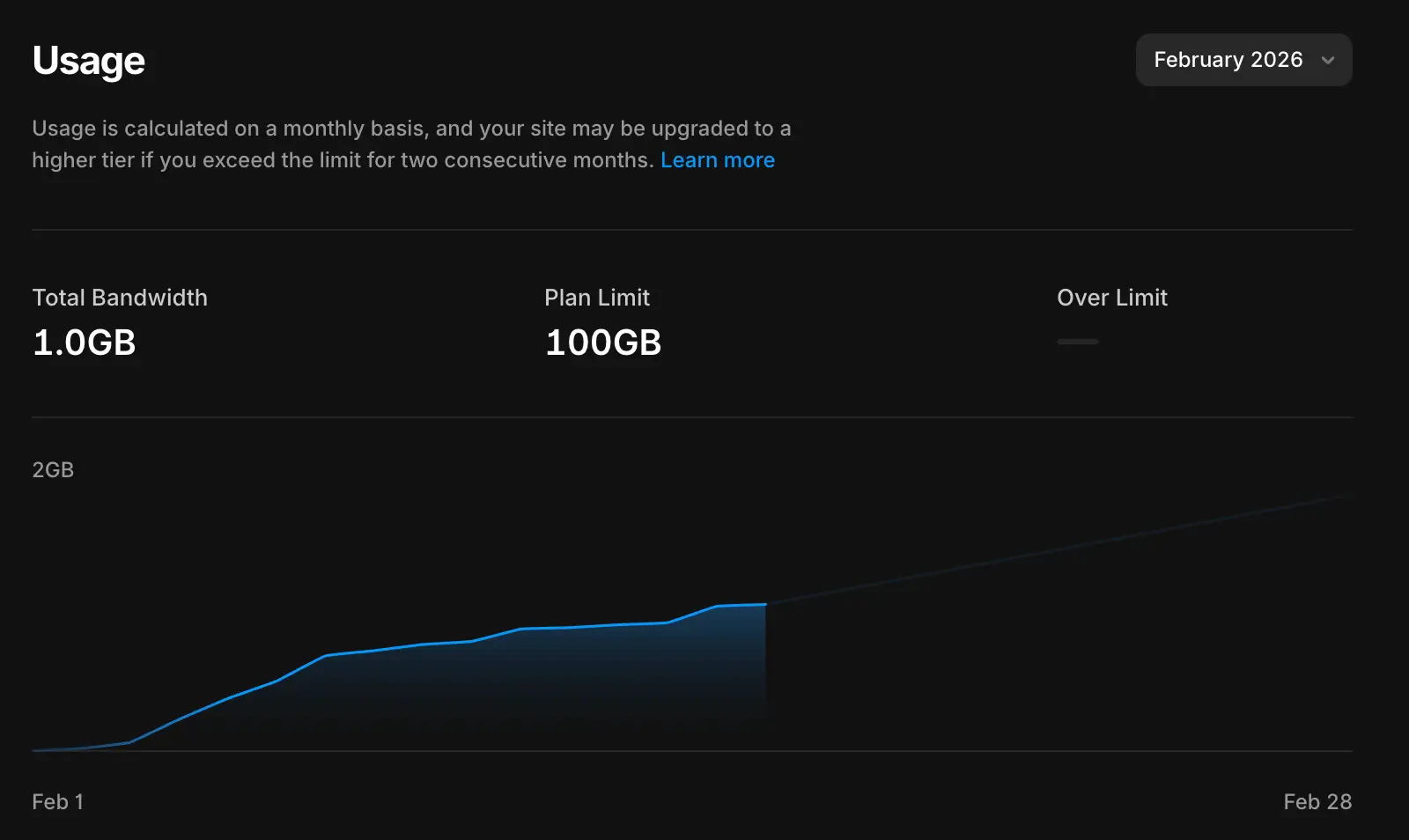
Bandwidth is not storage space. It is the total amount of data transferred from Framer's servers to your visitors' devices. Every time a user loads your homepage, they download images, fonts, videos, and code. If your homepage is 2MB and you get 1,000 visitors, you have used 2GB of bandwidth.
the limits
Plan | Bandwidth limit | Approx. monthly visits |
|---|---|---|
Basic | 10 GB | ~10,000 – 20,000 |
Pro | 100 GB | ~100,000 – 200,000 |
Scale | 200 GB + Add-ons | high traffic / viral |
what happens if you exceed the limit?
Framer uses "soft limits" for the Pro plan. If you go over 100GB once because of a viral post, they won't shut down your site. You will receive an email notification asking you to upgrade or optimize your site. However, on the Scale Plan, bandwidth becomes a hard cost. If you consistently exceed 200GB, you must purchase "Bandwidth Add-ons" (typically sold in 100GB chunks).
how to save money on bandwidth
Host videos externally: Do not upload 50MB MP4 files directly to Framer. Upload them to YouTube or Vimeo and embed them. This offloads the bandwidth cost to YouTube.
Optimize images: Framer does this automatically (converting to WebP), but you should still avoid uploading 10MB raw photos.
Framer pricing vs. WordPress costs
When you compare the two, Framer often seems more expensive upfront because WordPress is "free." However, once you factor in managed hosting, premium plugins, and security maintenance, WordPress is often higher.
Framer: Flat fee, includes hosting and security.
WordPress: Variable fee, requires separate hosting and plugin licenses.
For a detailed breakdown of the feature differences beyond just cost, read our full comparison on Framer vs WordPress: which one to choose.
the per site pricing confusion
The most common misunderstanding with framer pricing is the workspace structure. If you are an agency with 10 different client sites in one workspace, you do not pay one subscription fee. You pay for 10 separate site plans.
Scenario: You have a portfolio (Basic), a landing page for a client (Pro), and a testing sandbox (Free).
Bill: $10 + $30 + $0 = $40/month total.
This model is great because you don't pay for inactive sites, but it means costs scale linearly with the number of projects you launch.
hidden costs: editors and locales
To get the true total cost of ownership, you need to add these variable costs to your spreadsheet.
1. editor seats are billed separately
Framer charges for anyone who has "Edit" access to your project.
Cost: Approximately $20–$30 per editor/month.
The Trap: If you invite a copywriter to fix a typo and forget to remove them, you will be billed for their seat every month forever.
Solution: Use permissions to give freelancers temporary access, or use a "copy/paste" workflow where they send you text and you paste it in.
2. localization is an add-on
If you want to use Framer’s native translation features to serve a French or German version of your site, this is not included in the base price.
Cost: $20 per locale/month.
Impact: A site with 5 languages on the Pro plan costs $30 (Base) + $100 (5 Locales) = $130/month.
calculating your real bill
Before you commit, use this simple formula:
total monthly cost = site plan + (editors * $25) + $20)
We specialize in web development, building exclusively on high-speed platforms like Framer so that when we hand over the keys, you’re fully equipped to manage your site without surprise fees. If you’re ready to stop worrying about your website bill and start growing your business, contact us, we’re ready to help.
frequently asked questions
do i pay for the whole account or per site?
Framer charges per site, not per account. If you are an agency with five different client websites in your workspace, you will need five separate Site Plan subscriptions. This allows you to transfer the billing ownership of a single site to a client without affecting your other projects.
are editor seats included in the pro plan?
No. The Pro Plan covers the hosting and features for the website itself. Editor seats are billed separately at the Workspace level (typically $20–$30/month per person). We recommend keeping your editor count low by giving freelancers temporary access or using a "copy-paste" workflow for content updates.
what happens if i exceed my bandwidth limit?
On the Pro plan, Framer has a "soft limit" policy. If you exceed 100GB of bandwidth due to a viral post, your site will stay online, but you will receive an email asking you to upgrade. On the Scale plan, limits are stricter, and you may be charged for overages if you consistently exceed 200GB/month.
can i use the free plan for my business?
Not for a live site. The Free plan forces you to use a .framer.app subdomain (e.g., yourstartup.framer.app) and displays a "Made in Framer" badge in the corner. It is excellent for staging, prototyping, or internal testing, but professional businesses need the Pro plan to connect a custom domain.

I specialize in rapid, high-fidelity web development.
Understanding Framer pricing is more complex than just looking at the monthly subscription fee. Unlike many other website builders that charge a flat rate for your entire account, Framer operates on a "per-site" and "per-workspace" model that can surprise new users.
In 2026, the cost of running a professional Framer site ranges from free to over $500/month depending on your team size, traffic, and bandwidth usage. This guide breaks down the real costs so you can budget accurately before you build.
overview
For most professional marketing sites, the Pro Plan ($30/site/mo) is the mandatory starting point because it includes staging environments, redirects, and sufficient CMS limits.
However, the "advertised price" is rarely what you pay. You must also budget for Editor Seats ($20–$30/person) and Localization ($20/locale). If you are an agency or startup with three editors and two languages, your framer pricing bill will be closer to $150/month, not $30.
Recommendation: Start on the Free plan to design. Upgrade to Pro only when you are ready to connect a custom domain. Avoid the Basic plan for business sites as it lacks 301 redirects and staging.
Framer pricing tiers at a glance
Here is how the core plans break down for a single website in 2026. Note that these prices are per site, not for your whole account.
Plan | Price | Key limits |
|---|---|---|
Free | $0 | Framer subdomain, "Made in Framer" badge, 1 GB bandwidth. |
Basic | ~$10/mo | 30 pages max. No redirects. 10 GB bandwidth. |
Pro | ~$30/mo | 150 pages. Staging included. 100 GB bandwidth. |
Scale | ~$100/mo | 300 pages. 200 GB bandwidth. 99.99% uptime. |
Enterprise | Custom | Unlimited workspaces, SSO, dedicated support. |
bandwidth and framer pricing limits
One of the most confusing aspects of framer pricing is bandwidth. Most founders ignore this line item until they get a warning email.
what is bandwidth?
Bandwidth is not storage space. It is the total amount of data transferred from Framer's servers to your visitors' devices. Every time a user loads your homepage, they download images, fonts, videos, and code. If your homepage is 2MB and you get 1,000 visitors, you have used 2GB of bandwidth.
the limits
Plan | Bandwidth limit | Approx. monthly visits |
|---|---|---|
Basic | 10 GB | ~10,000 – 20,000 |
Pro | 100 GB | ~100,000 – 200,000 |
Scale | 200 GB + Add-ons | high traffic / viral |
what happens if you exceed the limit?
Framer uses "soft limits" for the Pro plan. If you go over 100GB once because of a viral post, they won't shut down your site. You will receive an email notification asking you to upgrade or optimize your site. However, on the Scale Plan, bandwidth becomes a hard cost. If you consistently exceed 200GB, you must purchase "Bandwidth Add-ons" (typically sold in 100GB chunks).
how to save money on bandwidth
Host videos externally: Do not upload 50MB MP4 files directly to Framer. Upload them to YouTube or Vimeo and embed them. This offloads the bandwidth cost to YouTube.
Optimize images: Framer does this automatically (converting to WebP), but you should still avoid uploading 10MB raw photos.
Framer pricing vs. WordPress costs
When you compare the two, Framer often seems more expensive upfront because WordPress is "free." However, once you factor in managed hosting, premium plugins, and security maintenance, WordPress is often higher.
Framer: Flat fee, includes hosting and security.
WordPress: Variable fee, requires separate hosting and plugin licenses.
For a detailed breakdown of the feature differences beyond just cost, read our full comparison on Framer vs WordPress: which one to choose.
the per site pricing confusion
The most common misunderstanding with framer pricing is the workspace structure. If you are an agency with 10 different client sites in one workspace, you do not pay one subscription fee. You pay for 10 separate site plans.
Scenario: You have a portfolio (Basic), a landing page for a client (Pro), and a testing sandbox (Free).
Bill: $10 + $30 + $0 = $40/month total.
This model is great because you don't pay for inactive sites, but it means costs scale linearly with the number of projects you launch.
hidden costs: editors and locales
To get the true total cost of ownership, you need to add these variable costs to your spreadsheet.
1. editor seats are billed separately
Framer charges for anyone who has "Edit" access to your project.
Cost: Approximately $20–$30 per editor/month.
The Trap: If you invite a copywriter to fix a typo and forget to remove them, you will be billed for their seat every month forever.
Solution: Use permissions to give freelancers temporary access, or use a "copy/paste" workflow where they send you text and you paste it in.
2. localization is an add-on
If you want to use Framer’s native translation features to serve a French or German version of your site, this is not included in the base price.
Cost: $20 per locale/month.
Impact: A site with 5 languages on the Pro plan costs $30 (Base) + $100 (5 Locales) = $130/month.
calculating your real bill
Before you commit, use this simple formula:
total monthly cost = site plan + (editors * $25) + $20)
We specialize in web development, building exclusively on high-speed platforms like Framer so that when we hand over the keys, you’re fully equipped to manage your site without surprise fees. If you’re ready to stop worrying about your website bill and start growing your business, contact us, we’re ready to help.
frequently asked questions
do i pay for the whole account or per site?
Framer charges per site, not per account. If you are an agency with five different client websites in your workspace, you will need five separate Site Plan subscriptions. This allows you to transfer the billing ownership of a single site to a client without affecting your other projects.
are editor seats included in the pro plan?
No. The Pro Plan covers the hosting and features for the website itself. Editor seats are billed separately at the Workspace level (typically $20–$30/month per person). We recommend keeping your editor count low by giving freelancers temporary access or using a "copy-paste" workflow for content updates.
what happens if i exceed my bandwidth limit?
On the Pro plan, Framer has a "soft limit" policy. If you exceed 100GB of bandwidth due to a viral post, your site will stay online, but you will receive an email asking you to upgrade. On the Scale plan, limits are stricter, and you may be charged for overages if you consistently exceed 200GB/month.
can i use the free plan for my business?
Not for a live site. The Free plan forces you to use a .framer.app subdomain (e.g., yourstartup.framer.app) and displays a "Made in Framer" badge in the corner. It is excellent for staging, prototyping, or internal testing, but professional businesses need the Pro plan to connect a custom domain.
I specialize in rapid, high-fidelity web development.
Understanding Framer pricing is more complex than just looking at the monthly subscription fee. Unlike many other website builders that charge a flat rate for your entire account, Framer operates on a "per-site" and "per-workspace" model that can surprise new users.
In 2026, the cost of running a professional Framer site ranges from free to over $500/month depending on your team size, traffic, and bandwidth usage. This guide breaks down the real costs so you can budget accurately before you build.
overview
For most professional marketing sites, the Pro Plan ($30/site/mo) is the mandatory starting point because it includes staging environments, redirects, and sufficient CMS limits.
However, the "advertised price" is rarely what you pay. You must also budget for Editor Seats ($20–$30/person) and Localization ($20/locale). If you are an agency or startup with three editors and two languages, your framer pricing bill will be closer to $150/month, not $30.
Recommendation: Start on the Free plan to design. Upgrade to Pro only when you are ready to connect a custom domain. Avoid the Basic plan for business sites as it lacks 301 redirects and staging.
Framer pricing tiers at a glance
Here is how the core plans break down for a single website in 2026. Note that these prices are per site, not for your whole account.
Plan | Price | Key limits |
|---|---|---|
Free | $0 | Framer subdomain, "Made in Framer" badge, 1 GB bandwidth. |
Basic | ~$10/mo | 30 pages max. No redirects. 10 GB bandwidth. |
Pro | ~$30/mo | 150 pages. Staging included. 100 GB bandwidth. |
Scale | ~$100/mo | 300 pages. 200 GB bandwidth. 99.99% uptime. |
Enterprise | Custom | Unlimited workspaces, SSO, dedicated support. |
bandwidth and framer pricing limits
One of the most confusing aspects of framer pricing is bandwidth. Most founders ignore this line item until they get a warning email.
what is bandwidth?
Bandwidth is not storage space. It is the total amount of data transferred from Framer's servers to your visitors' devices. Every time a user loads your homepage, they download images, fonts, videos, and code. If your homepage is 2MB and you get 1,000 visitors, you have used 2GB of bandwidth.
the limits
Plan | Bandwidth limit | Approx. monthly visits |
|---|---|---|
Basic | 10 GB | ~10,000 – 20,000 |
Pro | 100 GB | ~100,000 – 200,000 |
Scale | 200 GB + Add-ons | high traffic / viral |
what happens if you exceed the limit?
Framer uses "soft limits" for the Pro plan. If you go over 100GB once because of a viral post, they won't shut down your site. You will receive an email notification asking you to upgrade or optimize your site. However, on the Scale Plan, bandwidth becomes a hard cost. If you consistently exceed 200GB, you must purchase "Bandwidth Add-ons" (typically sold in 100GB chunks).
how to save money on bandwidth
Host videos externally: Do not upload 50MB MP4 files directly to Framer. Upload them to YouTube or Vimeo and embed them. This offloads the bandwidth cost to YouTube.
Optimize images: Framer does this automatically (converting to WebP), but you should still avoid uploading 10MB raw photos.
Framer pricing vs. WordPress costs
When you compare the two, Framer often seems more expensive upfront because WordPress is "free." However, once you factor in managed hosting, premium plugins, and security maintenance, WordPress is often higher.
Framer: Flat fee, includes hosting and security.
WordPress: Variable fee, requires separate hosting and plugin licenses.
For a detailed breakdown of the feature differences beyond just cost, read our full comparison on Framer vs WordPress: which one to choose.
the per site pricing confusion
The most common misunderstanding with framer pricing is the workspace structure. If you are an agency with 10 different client sites in one workspace, you do not pay one subscription fee. You pay for 10 separate site plans.
Scenario: You have a portfolio (Basic), a landing page for a client (Pro), and a testing sandbox (Free).
Bill: $10 + $30 + $0 = $40/month total.
This model is great because you don't pay for inactive sites, but it means costs scale linearly with the number of projects you launch.
hidden costs: editors and locales
To get the true total cost of ownership, you need to add these variable costs to your spreadsheet.
1. editor seats are billed separately
Framer charges for anyone who has "Edit" access to your project.
Cost: Approximately $20–$30 per editor/month.
The Trap: If you invite a copywriter to fix a typo and forget to remove them, you will be billed for their seat every month forever.
Solution: Use permissions to give freelancers temporary access, or use a "copy/paste" workflow where they send you text and you paste it in.
2. localization is an add-on
If you want to use Framer’s native translation features to serve a French or German version of your site, this is not included in the base price.
Cost: $20 per locale/month.
Impact: A site with 5 languages on the Pro plan costs $30 (Base) + $100 (5 Locales) = $130/month.
calculating your real bill
Before you commit, use this simple formula:
total monthly cost = site plan + (editors * $25) + $20)
We specialize in web development, building exclusively on high-speed platforms like Framer so that when we hand over the keys, you’re fully equipped to manage your site without surprise fees. If you’re ready to stop worrying about your website bill and start growing your business, contact us, we’re ready to help.
frequently asked questions
do i pay for the whole account or per site?
Framer charges per site, not per account. If you are an agency with five different client websites in your workspace, you will need five separate Site Plan subscriptions. This allows you to transfer the billing ownership of a single site to a client without affecting your other projects.
are editor seats included in the pro plan?
No. The Pro Plan covers the hosting and features for the website itself. Editor seats are billed separately at the Workspace level (typically $20–$30/month per person). We recommend keeping your editor count low by giving freelancers temporary access or using a "copy-paste" workflow for content updates.
what happens if i exceed my bandwidth limit?
On the Pro plan, Framer has a "soft limit" policy. If you exceed 100GB of bandwidth due to a viral post, your site will stay online, but you will receive an email asking you to upgrade. On the Scale plan, limits are stricter, and you may be charged for overages if you consistently exceed 200GB/month.
can i use the free plan for my business?
Not for a live site. The Free plan forces you to use a .framer.app subdomain (e.g., yourstartup.framer.app) and displays a "Made in Framer" badge in the corner. It is excellent for staging, prototyping, or internal testing, but professional businesses need the Pro plan to connect a custom domain.
I specialize in rapid, high-fidelity web development.
subscribe to our
weekly
newsletter
Get curated marketing insights, expert tips, and the latest agency news delivered straight to your inbox every week. Stay ahead with us.

subscribe to our
weekly
newsletter
Get curated marketing insights, expert tips, and the latest agency news delivered straight to your inbox every week. Stay ahead with us.
subscribe to our
weekly
newsletter
Get curated marketing insights, expert tips, and the latest agency news delivered straight to your inbox every week. Stay ahead with us.